Device setup
Mechanical design
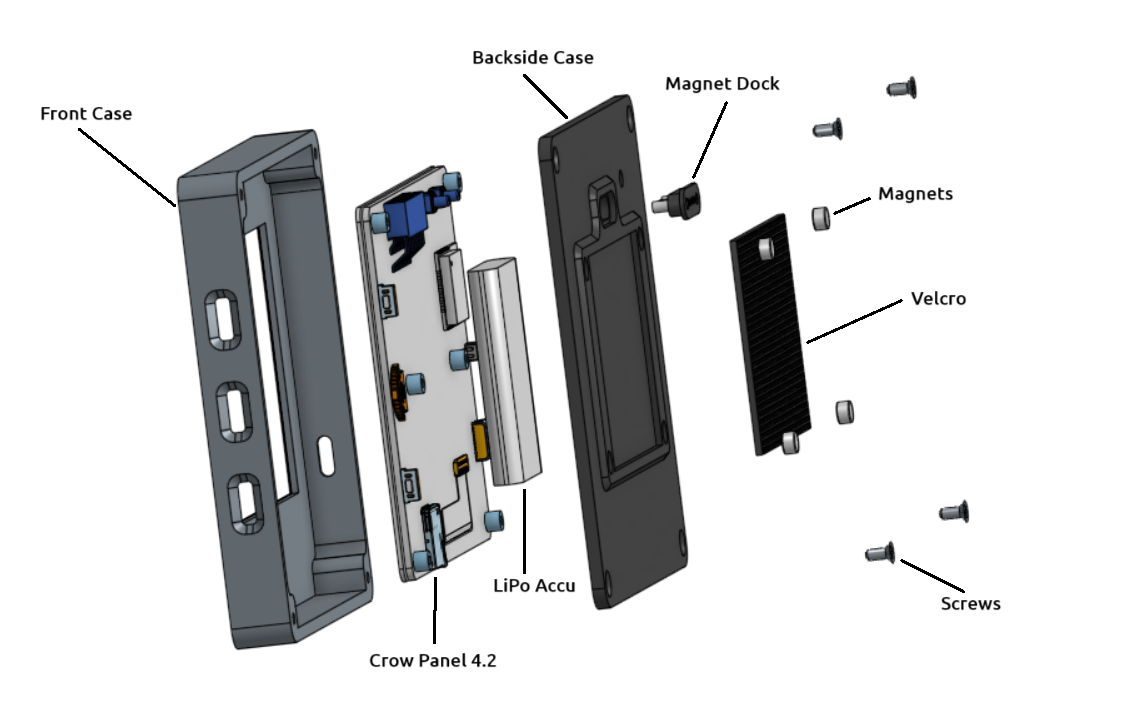
Abb.: Explosionsansicht OBP40 Main Unit
The diagram above shows the structure of the OBP40. The device consists of individual components, which are described below.
- Front Case
The front panel of the housing forms the end of the enclosure. It is designed as a box structure, making it torsionally rigid. Black surfaces are recessed into the front. The housing is 3D printed as a two-color part.
- Crow Panel 4.2
The Crow Panel 4.2 electronic unit with display is a commercially available unit from Elecrow. The Crow Panel 4.2 can be purchased directly from Elecrow or through some electronics retailers. It is shipped with test firmware that demonstrates its functionality. To use the Crow Panel 4.2 as an OBP40, a new firmware must be installed.
- LiPo Battery
The OBP40 can optionally be powered by a LiPo battery. This allows the OBP40 to operate autonomously for more than 8 hours. The LiPo battery is permanently soldered to the main board at defined points. The OBP40 is then continuously powered and can be put into a power-saving deep sleep mode when not in use.
- Backside Case
The rear panel completes the back of the case. It also includes a recess for the magnetic dock, the hook-and-loop fastener, and four neodymium magnets. The hook-and-loop fastener and magnets can be used as needed.
- Magnet Dock
The magnetic dock provides power and data transfer. It uses a USB interface. The magnetic dock charges the LiPo battery in the docking station and allows data transfer with other devices, such as a marine control server.
- Magnets
The magnets can be used to attach the OBP40 to the charging cradle or to metallic surfaces.
- Velcro
Optionally, hook-and-loop fasteners can be used on the back of the housing. This provides an independent mounting option on any surface.
- Screws
The four case screws connect the front panel to the back. These case screws are part of the Crow Panel 4.2 and can be reused with the OBP40.
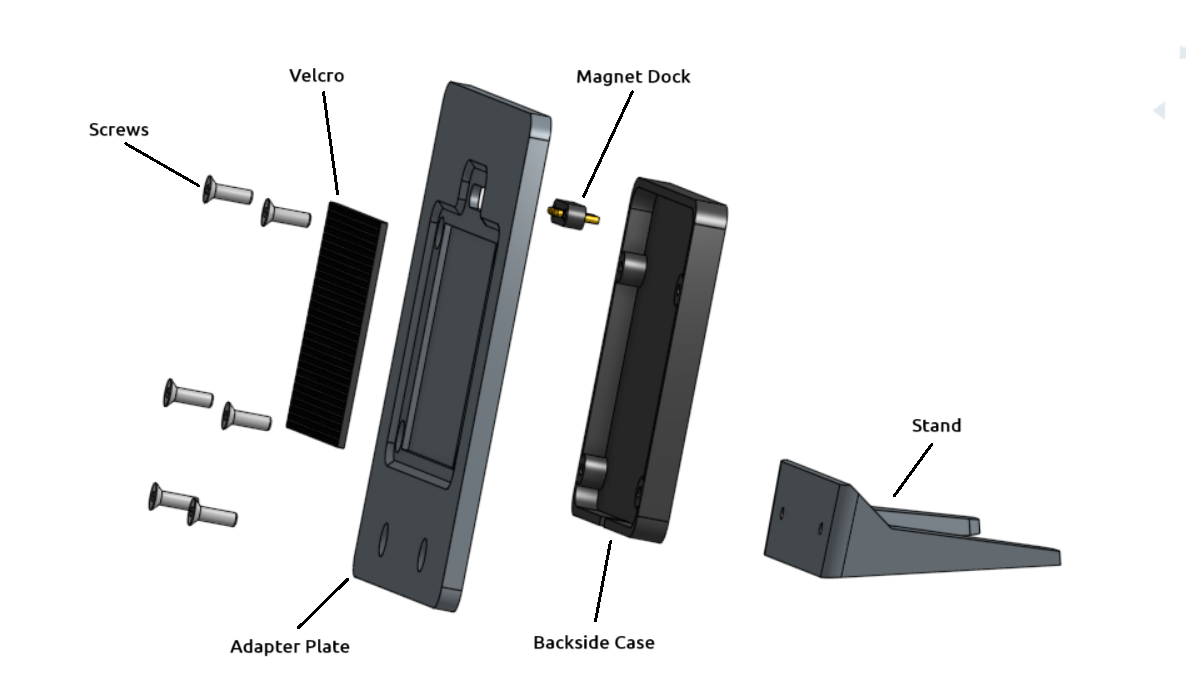
Abb.: Explosionsansicht Docking-Station
The docking station is designed to hold the OBP40. The OBP40’s battery can be charged in the docking station. Data transfer is also possible via a USB connection.
- Screws
The 6 screws connect the adapter plate to the back and the stand.
- Velcro
The Velcro strip is the counterpart to the Velcro strip on the back of the OBP40.
- Adapter Plate
The adapter plate is used to mount the OBP40. The OBP40 adheres to the four inner screws, which are used to attach the back panel, via magnets.
- Magnet Dock
The magnetic dock is the counterpart to the magnetic dock in the OBP40. The gold-plated contact pins are spring-loaded and can compensate for positional tolerances within certain limits. The interface is a USB interface. The magnetic dock is used for charging the LiPo battery in the docking station and for data transfer.
- Backside Case
The back panel is used to mount the magnetic dock. It also provides enough space for additional small electronic modules. A larger version of the back panel is also available, offering even more room for expansion.
- Stand
The stand is attached to the adapter plate via two screws. The stand slightly tilts the adapter plate, making the OBP40’s display easier to read.
Main Board
The Crow Panel 4.2 mainboard contains all electrical and electronic components such as:
Dual Core CPU ESP32-S3
Power supply
Display control
E-Paper-Display
Keys
GPIO expansion port
LiPo charging circuit
SD-Card-Adapter
USB-C
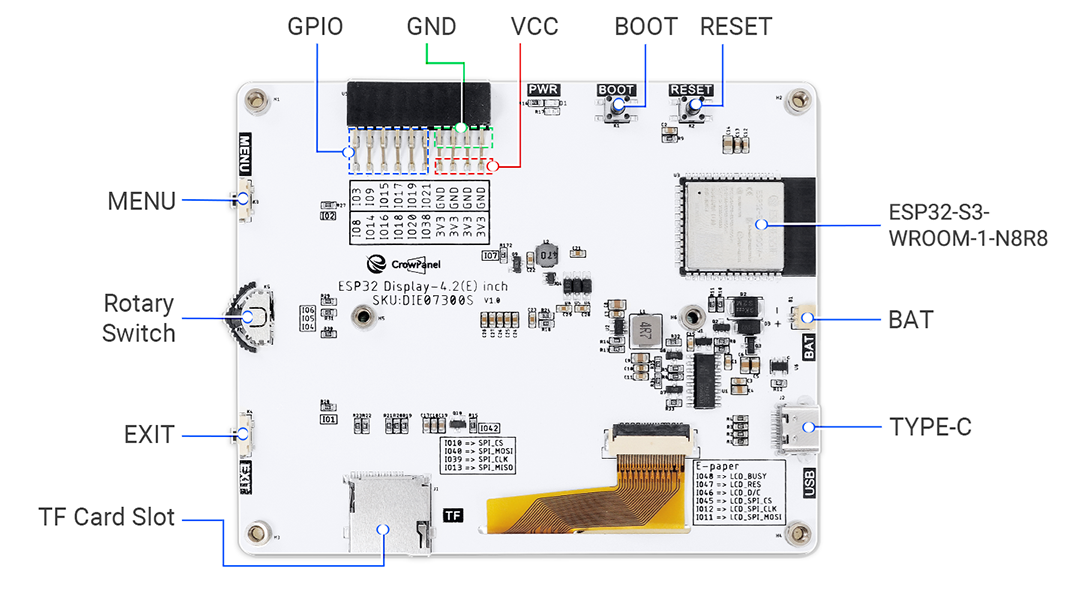
Fig.: Crow Panel 4.2 Mainboard Top (Elecrow)
Circuit diagram and manufacturing documents
The following are the documents for a replica.
The manufacturing data for the circuit diagram and the 3D data for the Crow Panel 4.2 are subject to the copyright of Elecrow. The specific type of copyright is unknown. The documents are publicly accessible via the wiki and GitHub and are in the public domain.
The 3D design documents for the mechanical parts of the OBP40 and the docking station are subject to Common Creative Lizenz (CC) BY BC SA 4.0. The OBP40 may be reproduced or modified, provided the authors are credited. There are no costs for private, non-commercial use. Commercial use is prohibited by the license. Derivative works are subject to the same license. If you intend to use the OBP40 commercially, please contact us via Kontaktformular. It is possible to acquire a non-exclusive right of use through a commercial license. The OBP40 firmware is licensed under the Apache 2.0 license.