Safety instructions
General information
The information published on this website was created as part of a hobby project. This open-source project is intended as a feasibility study, demonstrating how private projects can be implemented with limited resources. The quality in terms of functionality, security, and documentation is not comparable to commercial products. Use of the open-source software and hardware is at your own risk, and all liability is excluded.
Danger
Anyone interested should be aware that using the project presented here is at their own risk and that errors and malfunctions are to be expected, which could have serious consequences. Before using the OBP40, conduct a risk analysis and take appropriate measures to prevent damage and endangerment of others.
Note
NMEA2000 (TM), NMEA0183 (TM), SeaTalk (TM), and SeaSmart (TM) are registered trademarks of their respective owners. These names are used on this page as synonyms for these protocol types. References to them in the descriptions refer to open-source implementations that do not fully meet the quality requirements and specifications of the respective trademark owners. The software and hardware are intended for experimental use in knowledge acquisition and should not be connected to or operated with safety-critical systems such as autopilots. No guarantee can be given for the correct implementation of the protocols or their operational reliability.
Danger
Integrating open-source implementations into certified bus systems can lead to errors, malfunctions, and total failures.
If you experience any problems or defects, please inform us via Kontaktformular. This will allow us to address quality and safety issues and take corrective action.
WiFi network security
You should only connect the OBP40 to trusted Wi-Fi networks. The device has very limited protection against network sniffing or denial-of-service attacks. As long as you use the OBP40’s own independent Wi-Fi network, unauthorized individuals cannot easily access it. This ensures that data transmission remains secure within your own Wi-Fi network. Never connect the device directly to the internet without a firewall, and avoid direct connections to open port Wi-Fi networks. Doing so could allow unauthorized individuals to access your devices on the network.
Note
You can increase security by using a separate Wi-Fi or LTE router on your boat. These routers can be configured to create a private Wi-Fi network to which all devices on board can connect. Most mobile routers have a built-in firewall, allowing you to connect your private Wi-Fi network to the internet. The firewall prevents unauthorized access to your devices. This way, all devices on your network share internet access while remaining adequately protected.
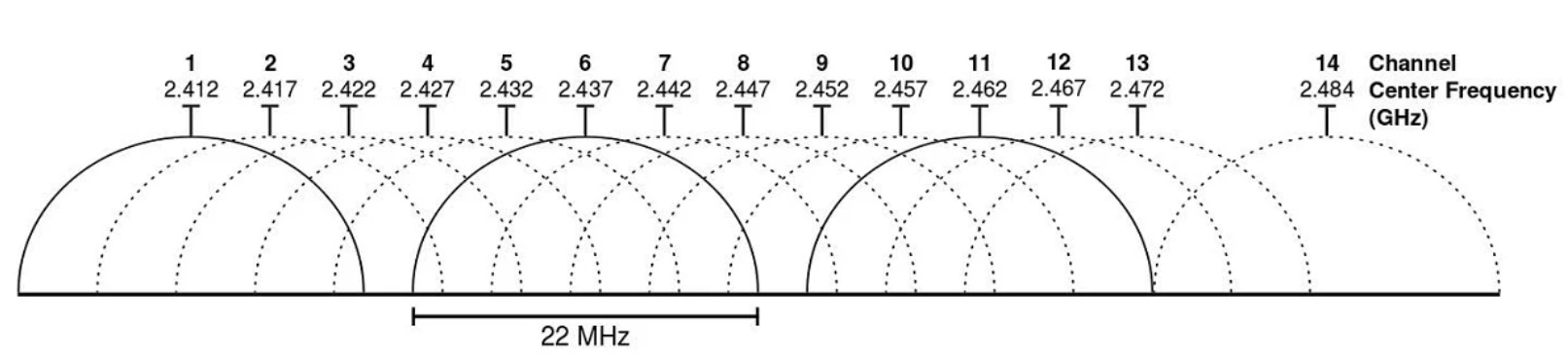
The connection quality of Wi-Fi networks depends significantly on the occupancy of the radio channels currently in use in your area, as your device shares these same channels with other users on different Wi-Fi networks. The OBP40 uses the radio channels of the 2.4 GHz frequency band.
Warning
During periods of high network traffic, such as in harbors, the connection quality of your own Wi-Fi network may be affected. You should then expect delays in data transmission, especially when using TCP data connections to or from the OBP40. However, always ensure that the navigation of your boat is not impaired in such situations.
Hint
When channels are heavily congested, use less congested ones. Channels 1, 13, and 14 have only one adjacent channel and are significantly more robust against high congestion than the other channels. Channel 13 is best because it is used less frequently. In the US, channel 14 can also be used. Modern mobile routers often offer an automatic setting in their configuration that helps optimize channel selection.
When changing the OBP40 configuration, you will always be prompted for the administrator password. The password is always transmitted encrypted. However, if you change the password for the Wi-Fi access point or the Wi-Fi client, it will be sent in plain text. If you enable Remember me for the administrator password, it will be saved in plain text in your browser. To remove it from there, use Forget Password.