Questions and answers
Why does the screen flicker at regular intervals?
The screen flickering serves to refresh the screen content. At regular intervals, the display must completely renew the screen content through a full refresh to remove ghosting and refresh the contrast. This involves inverting the image content, clearing it several times, and then completely reconstructing it.
I have two CrowPanel 4.2 displays for my OBP40. Why does the screen of one display flicker differently than the other?
Elecrow sells the CrowPanel 4.2 with ePaper displays in two versions. The newer version has a display that uses a very fast refresh rate. The display itself is not defective; it simply behaves differently than the display in the first version. This refresh rate cannot be changed via software, as the function is hard-coded into the display controller. Unfortunately, both displays are sold under the same part number, making it impossible to determine which display you will receive when ordering. If the faster refresh rate is bothersome, the only solution is to replace the display with one from the first version. Obtain a display of type GDEY042T81 from Good Display. Replacing the ePaper display is not straightforward, as it is glued directly to the circuit board. To facilitate removal of the display from the board, place the CrowPanel 4.2 in the oven at 70°C for 20 minutes before disassembly. This softens the adhesive and makes it easier to remove the display. Afterwards, remove all adhesive residue and reattach the new display using new double-sided adhesive tape.
How can I reduce screen flickering?
The timing of a full refresh depends on several factors. For the first 5 minutes after restarting the device, a full refresh occurs every minute to allow the display to adjust to its temperature from a cold state. A full refresh is also performed after each page change. This applies to the last page viewed, provided it is displayed for at least 4 seconds. This page-change behavior can be disabled using the Refresh parameter. However, this has the disadvantage that ghost images from older pages cannot be completely removed. Additionally, you can define the general interval at which a full refresh is performed. The cycle time can be set between 1 and 10 minutes using the Full Refresh Time parameter. The full refresh can also be accelerated using the Fast Refresh parameter. With this setting, full refreshes occur more quickly. Descriptions of the refresh settings can be found in the chapter Config - OBP Display. The screen refresh settings also affect the screen contrast in sunlight.
Why does the display fade in sunlight?
In extreme sunlight, the e-paper display heats up, causing a loss of contrast during partial screen refreshes. The image becomes increasingly gray, and some lines appear on the display. The display itself is not defective. This issue can be resolved with a full refresh.
What can be done about it?
The effect can be reduced by avoiding direct sunlight on the display. Another way to improve performance is to increase the frequency of full refresh cycles. Chapter Config - OBP Display contains a table of recommended settings under various conditions. The device’s power consumption also affects contrast loss, as heat generated within the device contributes to the temperature increase.
What options are there to reduce electricity consumption?
Power consumption can be reduced by setting the access point to shut down automatically after a predefined period. Additionally, the processor clock speed can be reduced. Some devices, such as the OBP60, have special power-saving functions via the Power Mode parameter. Details on power-saving functions can be found in the Config - OBP Hardware section.
Why aren’t WiFi connections working properly?
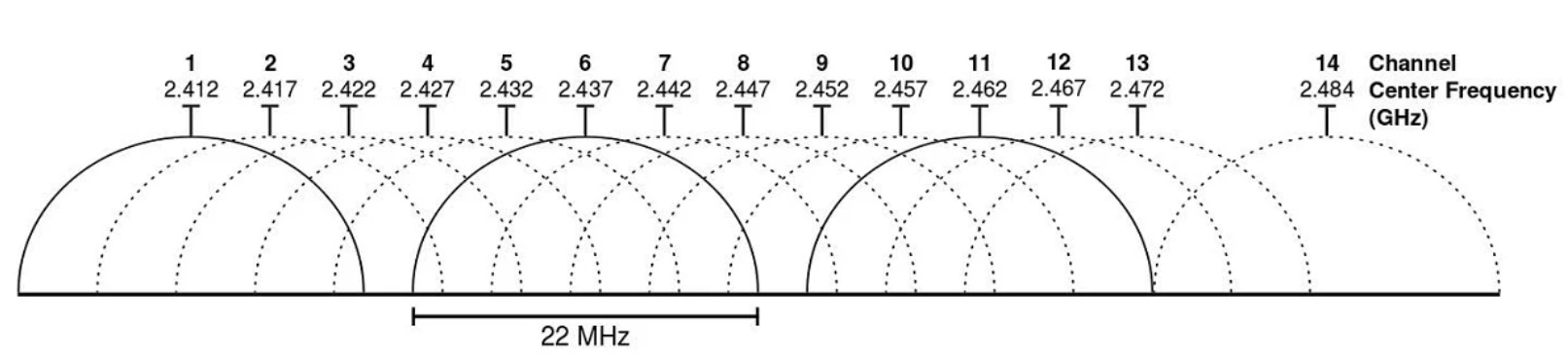
WiFi connections are limited to the 2.4 GHz frequency band. Other users outside your access point use the same frequency band and must share the bandwidth with them. In larger ports, the bandwidth of all channels can become saturated by too many users. In this case, data transmission delays occur. You should then expect a sluggish response time to the measurement data on the display when the data is transmitted via WiFi connections. Wired data transmissions from bus systems such as NMEA2000 or NMEA0183 are not affected. Selecting channels 1 and 13 for transmission can help somewhat, as they are located at the edges of the 2.4 GHz frequency range and have only one adjacent channel.