Commissioning
This section covers the initial setup of your OBP40. This involves connecting the device to power on to configure the initial settings. This allows you to test its functionality before using it on your boat.
USB-C power supply
The OBP40 is powered via USB-C. However, the USB port must be able to supply sufficient voltage of 5V and current up to 1A.
Note
Many USB computer ports don’t have a sufficiently high output current and share the available power with multiple ports. This can prevent the OBP40 from being powered directly from a PC. Cable quality and length are also crucial. Some cables have insufficient cross-sections, resulting in a high voltage drop across the conductors. The voltage at the USB-C port will then be too low. In such cases, use a suitable power adapter, such as those used for charging mobile phones or tablets.
To test whether the USB-C power supply is providing sufficient voltage and current, a USB-C diagnostic tool can be used. The diagnostic tool is connected to the OBP60’s input, and the USB-C power cable is plugged into the diagnostic tool. The supplied voltage and current current consumption can be read on the display. The voltage should be at least 5.0 V. The current will vary depending on the current draw.
Hint
Depending on the USB-C diagnostic device used, only the power supply pins may be connected, and no data transfer may be possible. If you require communication via USB-C, you must disconnect the diagnostic device.
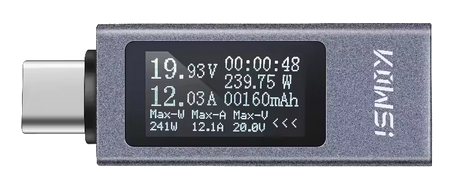
Fig.: USB-C diagnostic device
Turning off the OBP40
The OBP40 does not have a separate on/off switch. The device is simply powered off by unplugging the USB connector. The device then switches off.
Note
If you are optionally using a LoPo battery for mobile use, simply unplugging the USB cable is not sufficient, as the device is continuously powered by the battery. To switch off the device, the OBP40 can be put into deep sleep mode by pressing and holding the selection wheel in the center position until the message “Sleep Mode” appears on the display. The OBP40 will then be in a power-saving deep sleep state. Depending on the battery’s condition, the LoPo battery can keep the OBP40 in deep sleep for up to 1.3 years. The device can be woken up by pressing the selection wheel again. It takes approximately 5 seconds for the device to fully start up.
Use
The OBP40 can be used both portably and stationary with the charging cradle. When the OBP40 is in the charging cradle, the LiPo battery is automatically charged, provided a LiPo battery is used. The battery’s charge level can be displayed if a voltage divider for measuring the battery voltage is also installed. The firmware supports the battery and charge level indicator functionality if the corresponding compiler flags are set in the software and the firmware has been recompiled and uploaded to the OBP40.
The charge level is displayed in 20% increments and is shown in the status bar via the battery icon with a fill level bar.
Warning
Do not expose the OBP40 to direct sunlight, as the e-paper display does not have a UV filter and may lose contrast in direct sunlight. Protect the OBP40 from direct contact with water such as rain or spray. The OBP40 is not waterproof and can only be used in dry environments.
Hint
If you intend to use the OBP40 outdoors, use it in a shaded and protected area under the sprayhood or cover it when not in use.